

Make your own painted portrait
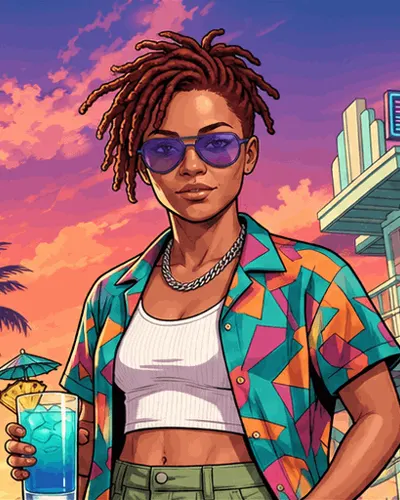 Example
- 1photo of you
- 9:16portrait PNG
- 1Kresolution
- 2paint looks
- 5credits each
How do you make a GTA loading screen of yourself?
Pick the Loading-screen portrait scene, upload one photo, and Game Filter paints you as the hero of a game loading screen in one tall PNG.
The short answer
To make a GTA loading screen of yourself, open the Loading-screen portrait scene in Game Filter, which this page already selects, and upload one clear photo of your face. Game Filter paints a single 9:16 PNG at 1K resolution in which you are the posed, painted character of a GTA loading screen, and each portrait costs 5 credits. The result is a picture made by AI from your photo, not a screenshot from any Rockstar Games title.
How to make a GTA loading screen portrait in 3 steps
Keep the Loading-screen portrait scene selected
This page opens with Loading-screen portrait already chosen as the scene. The other 4 scenes are still in the list if you change your mind, but only this one frames you as a single posed character the way the original artwork does.
Upload a head-and-shoulders photo
Use one photo of one person, facing the camera, with even light on the face. The portrait uses a close, heroic framing, so a photo where your face and shoulders are sharp gives the strongest likeness.
Choose Poster or Classic and sign in
Poster paints the loading screen with heavy colour and sunset light; Classic draws it flatter, closer to a comic. Sign in, press Make my loading screen, and the 9:16 PNG appears in the result panel. A portrait that fails returns its 5 credits.
What makes a picture look like a game loading screen
One character, posed like a cover star
GTA loading screens are known for a single painted character striking a pose, filling most of the frame. The Loading-screen portrait scene puts you in that spot, with you as the only subject.
Painted, not photographed
The look comes from illustration: bold outlines, smooth painted skin and saturated colour. Game Filter repaints your photo in that manner instead of placing a cut-out of you on a background.
A warm, sunny backdrop
The scene preview above shows the mood the Loading-screen portrait aims for: palms, a bright sky and holiday colour behind you. The exact background changes from run to run, while you stay the centre of the portrait.
A tall frame for phones
Each portrait comes out as a vertical 9:16 PNG. That shape fits a phone lock screen, an Instagram or TikTok story, and a square crop for a profile picture.
Poster or Classic for your portrait
| Poster | Classic | |
|---|---|---|
| Paint style | Thick colour, hard outlines | Flatter, comic and anime mix |
| Light | Hot sunset glow | Even, illustrated light |
| Closest to | Recent GTA cover art | Older painted game art |
| Output | One 9:16 PNG, 1K | One 9:16 PNG, 1K |
| Credits | 5 | 5 |
Where to use a painted portrait of yourself
Profile picture
Crop the centre of the 9:16 PNG to a square and the painted face reads clearly at small sizes on Discord, X, Instagram or a gaming profile.
Phone wallpaper
The vertical portrait already matches a phone screen, so it works as a lock screen with no cropping.
Story or post
Post the portrait as a story, or pair it with a short clip from the homepage tool for a before-and-after post of the same scene.
GTA loading screen portrait FAQ
Paint yourself as the loading screen hero
One photo, the Loading-screen portrait scene and 5 credits give you one painted 9:16 PNG of yourself.
Related pages
How do you turn your own photo into a GTA 6 AI clip?
To make a GTA 6 AI video, upload 1 front-facing photo, pick 1 of 5 scenes and download a 5-second 9:16 clip; 3 steps, 10 credits per clip.
Where did the "before GTA 6" meme come from?
The joke "We got X before GTA 6" spread on Reddit and TikTok in 2023. Learn the format, the GTA 5 vs GTA 6 split, and how to star in your own.
What can a GTA style art generator make from one photo of you?
Game Filter is a GTA style art generator: upload 1 photo, pick 1 of 5 scenes and 1 of 2 looks, and get one 9:16 PNG picture of you for 5 credits.